

The Oddire drone, featuring the latest upgraded chip, is packed with an array of exciting functions that promise an enjoyable flying adventure for both beginners and experienced pilots. In this review we have covered very important features of this drone which is highly suitable for new beginners, especially kids in 2025. These functions include trajectory flight, gravity control, 3D flips, headless mode, three-speed settings, one-key takeoff/landing, gesture photo, and even VR compatibility. Some functions are controlled via the app, making the drone a great present for birthdays and holidays.
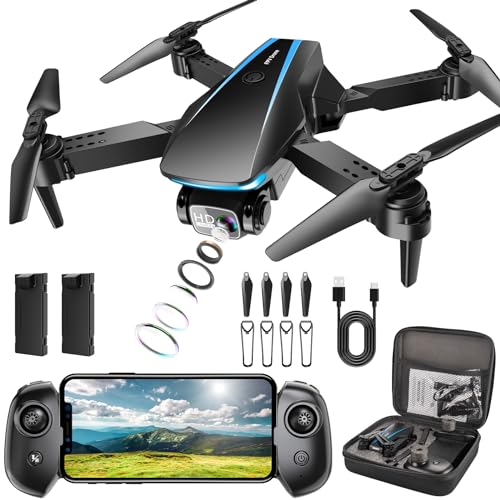
- Multiple Functions Drone: Based on the newest upgraded chip than others, our drone has multiple interesting...
- 1080P FPV & Electric Adjustable Camera: This Oddire drone equips an HD 1080P camera, which assists you in catching...
- Stable Hover & User Friendly: Equipped with an Optical Flow Positioning Camera, the drone has a more stable hover...
Equipped with an HD 1080P camera, the drone captures stunning aerial views from a bird’s-eye perspective. The camera can be remotely adjusted up to 90 degrees, and the upgraded hover system combined with optical flow positioning technology ensures stability when shooting. This allows users to enjoy real-time panoramic views and share them on social media effortlessly.
The drone’s Optical Flow Positioning Camera enables stable hover altitude. Before takeoff, calibrate it by placing it on flat ground, turning it on, and moving both joysticks inwards at a 45-degree angle simultaneously. The one-key takeoff/landing function simplifies flying for beginners, while the altitude hold feature maintains the drone’s position in the air without manual intervention.
With two rechargeable batteries, the drone offers an extended flight time of approximately 25-28 minutes, ensuring a worry-free flying experience. It includes safety features such as over-current protection and an emergency stop. The controller, designed for a comfortable grip, enhances the overall experience, making users feel like they’re dominating a game.
To connect the drone, download the “ODDIRE GO” app and follow these steps: place the drone on the ground, turn on the drone and controller (they will connect automatically), open your mobile phone’s Wi-Fi list, and connect to the network starting with “ODDIRE_X-28_XXXXXX.” Photos and videos will be saved directly to your phone, eliminating the need for an SD card. If any issues arise, contact customer support for assistance within 24 hours.
Remember to calibrate the drone before flight by turning it on, short-pressing the remote control power button, and moving the joysticks inward at a 45-degree angle. Ensure the battery is fully charged (90 minutes) and enable camera permissions on your phone for the app. Double-check that the drone blades are correctly positioned (A and B directions) before flying to ensure optimal performance.